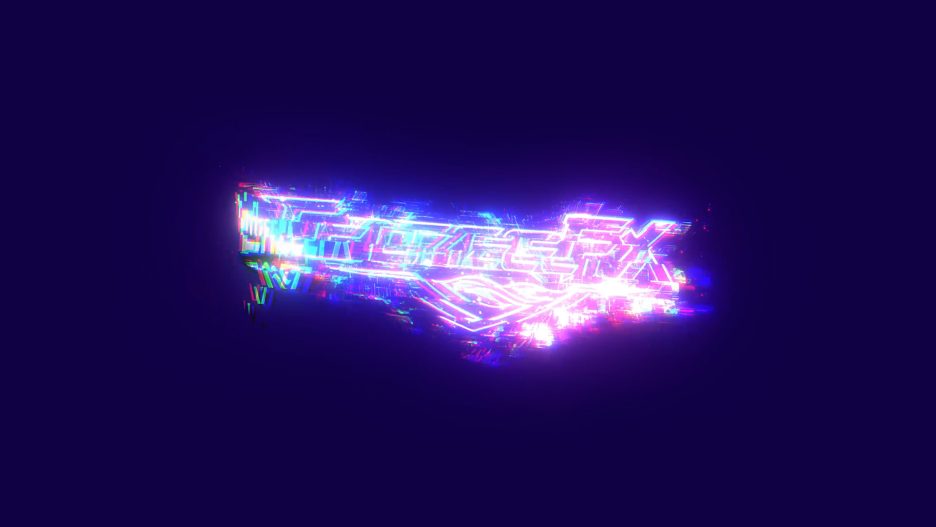
Give your brand a bold, modern, and digitally inspired introduction with the Glitch Logo Reveal After Effects Template. Designed for creators who want to make a powerful first impression, this glitch-style logo intro brings a futuristic digital atmosphere to your logo, brand identity, YouTube channel, gaming content, promotional video, or creative project.
If you are looking for a stylish Glitch Logo Reveal for Adobe After Effects CC18, this template is an excellent choice for adding a contemporary digital aesthetic to your videos without building a complex animation from scratch. Inspired by the visual language of digital interference, distorted signals, cyber-inspired graphics, electronic media, and modern motion design, the Glitch Logo Reveal is ideal for projects that need a distinctive, energetic, and technology-focused presentation.
A logo is more than just a symbol. It represents your brand, your identity, your creative vision, and the message you want your audience to remember. Presenting that logo through a carefully designed reveal can help your video feel more polished and memorable. With this Glitch Logo Reveal template, you can introduce your logo with a digital-inspired visual style that complements technology brands, gaming channels, software companies, digital agencies, creative studios, music videos, social media content, and modern promotional campaigns.
The project is designed to provide a convenient starting point for creators who want to incorporate a glitch-themed logo introduction into their video editing workflow. Instead of creating every element manually, you can use the provided After Effects project, customize it for your requirements, and adapt the presentation to suit your visual identity.
Whether you are a professional video editor, motion graphics designer, YouTuber, gamer, content creator, freelancer, digital marketer, or beginner learning Adobe After Effects, this template gives you a practical way to create a technology-inspired brand introduction for your next video project.
⚡ A Modern Digital Glitch Logo Introduction
Digital glitch aesthetics have become a recognizable visual language in contemporary design. They are commonly associated with technology, gaming, cyber-inspired visuals, electronic music, digital communication, futuristic interfaces, and experimental motion graphics.
The Glitch Logo Reveal embraces this creative direction, making it a suitable option for projects that require a modern and digitally influenced identity. Its visual concept works particularly well for brands that want to communicate innovation, creativity, energy, and a connection with the digital world.
Use this template as an introduction to your brand, a logo presentation at the beginning of a video, a visual identity element for your YouTube channel, or a creative opener for promotional content. You can also incorporate the logo reveal into a larger video project alongside titles, footage, music, transitions, and other motion graphics.
A glitch-inspired logo introduction can help establish the tone of your content before the main video begins. It can make a technology-focused presentation feel more contemporary, give a gaming channel a stronger visual identity, or provide a creative finishing touch to a digital marketing video.
The template is especially suitable for creators who appreciate modern visual design and want to move beyond a basic static logo presentation.
🎬 Project Features
- Software: Adobe After Effects CC18
- Resolution: 1920 × 1080 pixels
- Format: Full HD, 16:9 widescreen
- Plugins: No additional plugins required
- Ease of Use: Easy-to-use project structure
- Rendering: Designed for a convenient, fast-rendering workflow
- Customization: Customizable project elements
- Tutorial Support: Check the Tutorial Page for Editing Templates
- Music: Music included
- File Size: Approximately 3.96 MB
- Availability: Free Download, according to the template listing
Resolution note: The supplied specifications list “4K – 1920 × 1080.” However, 1920 × 1080 is Full HD, not native 4K. Native 4K UHD resolution is 3840 × 2160 pixels. The resolution above reflects the actual dimensions supplied for this project.
💻 Compatible with Adobe After Effects CC18
This Glitch Logo Reveal project is intended for Adobe After Effects CC18, making it a useful option for editors working with that version of the software.
Adobe After Effects is widely used for motion graphics, visual effects, title animation, logo animation, compositing, and branded video content. Using an After Effects template can help streamline your workflow by giving you a project to customize instead of requiring you to create the entire animation independently.
The template provides a starting point for presenting your logo in a glitch-inspired style. You can work within the project, review its editable elements, and make suitable adjustments to match your logo and intended presentation.
For the best results, open the project in a compatible After Effects installation and follow the included project instructions or the relevant tutorial available on the Tutorial Page.
If you are using a newer version of After Effects, compatibility may depend on the project setup and the features used in the original file. It is always a good idea to open the project and check that all required assets are available before beginning your final render.
🚀 No Plugins Required
One of the useful advantages of this template is that no additional plugins are required, according to the supplied project features.
Third-party plugins can sometimes add extra steps to a motion graphics workflow. They may need separate installation, licensing, compatibility checks, or configuration before a project can be opened and rendered successfully.
A no-plugin template can make the process more convenient for editors who prefer to work with the effects and features available in their existing After Effects setup.
This is particularly useful for independent creators, students, freelancers, small businesses, and video editors who want to avoid unnecessary plugin dependencies.
You can focus on preparing your logo, reviewing the project settings, customizing the available elements, and producing the final video rather than spending time searching for additional plugin packages.
Please note that no-plugin requirements do not eliminate the need for compatible software, project assets, or any instructions supplied with the template.
🎨 Customizable Logo Presentation
Your logo is an important part of your visual identity, and a good logo introduction should complement your brand rather than distract from it.
The Glitch Logo Reveal template is described as customizable, allowing you to adapt the project to your creative requirements. Depending on the editable elements provided in the project, you can prepare your logo, adjust available settings, and tailor the presentation to your brand or channel.
Customization is useful when creating branded content for different platforms and audiences. A technology company may prefer a clean, digital identity, while a gaming channel may use a more energetic visual direction. A music producer may want a logo intro that fits the mood of an electronic music video, while a digital agency may use the reveal as part of its promotional content.
You can consider using the template for:
- Personal logos and creator identities.
- YouTube channel branding.
- Gaming team and esports identities.
- Technology and software company introductions.
- Digital agency promotional videos.
- Music producer and DJ branding.
- Portfolio presentations.
- Creative studio showreels.
- Social media promotional content.
- Video intros and branded presentations.
Before exporting, preview the composition carefully and confirm that your logo is positioned correctly, remains readable, and fits the intended video format.
⚡ Convenient and Fast Rendering Workflow
Rendering time is an important consideration for video editors, particularly when working with multiple client projects, recurring social media content, or tight delivery deadlines.
The Glitch Logo Reveal is listed as a fast-rendering template. Actual rendering time will depend on several factors, including your computer’s hardware, the version of After Effects, project settings, output format, resolution, and any effects used in the composition.
For a smoother workflow, close unnecessary applications, use the recommended composition settings, and select an export format appropriate for your intended use.
If you plan to use the reveal across several projects, keep a reusable version of your customized project so that you can update your logo or other editable elements when needed. This can help reduce repetitive setup work and support a more consistent visual identity across your content.
Always preview the final output before publishing. Check the logo’s readability, the timing of the reveal, the audio, and the overall appearance to make sure the result meets your expectations.
🎵 Music Included
Music can play an important role in the overall impact of a logo reveal. A well-matched soundtrack helps establish a mood, supports the rhythm of the presentation, and gives the opening of a video a more complete feel.
The supplied features indicate that music is included with this project. This gives you an audio element to work with when preparing your final logo introduction.
Depending on your creative needs, you may use the included music as part of the reveal or replace it with another track that better matches your brand. For example, a technology brand may prefer an electronic sound, a gaming creator may choose energetic background music, and a professional company may use a restrained audio identity.
Before using the included music in a commercial project, check the template’s licensing terms and confirm that the audio is permitted for your intended use, including monetized videos, advertisements, client work, and social media uploads.
🎮 Ideal for Gaming Channels and Esports Branding
Gaming content often benefits from a recognizable visual identity. A logo reveal can help introduce a channel, gaming team, esports organization, streamer, or gaming-related project before the main content begins.
The digital aesthetic associated with glitch graphics makes this template a natural creative option for gaming-focused videos. It can be used as an introductory element for gameplay highlights, tournament recaps, channel trailers, gaming montages, promotional videos, and creator announcements.
You can incorporate the reveal into a larger editing project alongside gameplay footage, commentary, titles, sound effects, and other branded elements.
For streamers and content creators, consistent branding across videos can help viewers recognize the channel from one upload to the next. A reusable logo introduction provides a simple way to maintain that consistency.
Potential applications include:
- Gaming YouTube intros.
- Esports team logo presentations.
- Streamer branding videos.
- Gameplay montage openings.
- Gaming event promotional content.
- Tournament highlight videos.
- Gaming community announcements.
- Channel trailers and identity videos.
For the most professional result, use a high-quality version of your logo and make sure its shape and lettering remain clear against the composition background.
🖥️ Perfect for Technology and Software Brands
Technology companies often use clean typography, digital visuals, and contemporary motion graphics to communicate innovation and technical expertise. A glitch-inspired logo introduction can complement that visual language when used appropriately.
This template can be considered for software developers, IT service providers, technology startups, app developers, digital product creators, web development agencies, cybersecurity-related content, and other technology-focused brands.
It can introduce a company presentation, software demonstration, product announcement, portfolio video, promotional reel, or online tutorial series.
For a business audience, the overall presentation should remain consistent with the company’s identity. Consider the logo’s proportions, the background, the color palette, and the tone of the surrounding content. A reveal used in a formal corporate presentation may need a more restrained context than one used for an entertainment-focused video.
A well-integrated logo intro can help make your content look consistent without replacing the importance of clear messaging, good editing, and strong visual communication.
📺 Great for YouTube Intros and Channel Branding
A YouTube intro can establish a recognizable identity for your channel and help connect your videos to your brand.
The Glitch Logo Reveal can be used as an opening element for channels focused on technology, gaming, tutorials, software reviews, digital creativity, music, entertainment, and other subjects that suit a modern digital aesthetic.
You can include the reveal at the beginning of a channel trailer, a branded video, a tutorial series, or a special announcement. It can also serve as a recurring identity element across a collection of videos.
When designing a YouTube intro, keep your audience’s viewing experience in mind. A short, purposeful introduction is often more effective than a long opening that delays the main content. Ensure that the logo is readable and that the reveal complements the pacing of your video.
Suggested uses include:
- YouTube channel logo intros.
- Tech review channel branding.
- Gaming channel openings.
- Tutorial and educational video branding.
- Creator portfolio introductions.
- Channel trailer presentations.
- Branded series openings.
- Video announcements and special uploads.
For YouTube publishing, export your finished video using settings suitable for the platform and check the final playback before uploading.
📱 Social Media and Digital Marketing Applications
Consistent branding is valuable across social media because viewers may encounter your content on different platforms, through different formats, and at different stages of a campaign.
A customized logo reveal can help establish a recognizable opening for promotional videos, product teasers, brand announcements, campaign edits, and short-form content.
You can use the After Effects project as a starting point for creating a branded video asset that can be incorporated into social media content. Depending on your requirements, you may also create alternate edits for different aspect ratios or placements.
Potential applications include:
- Instagram promotional videos.
- Facebook brand videos.
- LinkedIn company presentations.
- YouTube Shorts branding edits.
- Digital marketing campaigns.
- Product launch announcements.
- Promotional reels.
- Agency showreels.
- Creator announcements.
- Online portfolio videos.
The supplied composition is 1920 × 1080, which is a horizontal 16:9 format. If you need vertical or square versions for particular social platforms, check the project structure and adapt the composition as necessary. Reframing may require repositioning or resizing elements to maintain the intended visual quality.
🎧 Music Producers, DJs, and Electronic Music Creators
Glitch-inspired graphics are frequently associated with electronic music, digital art, experimental visuals, and contemporary audiovisual design.
This makes the Glitch Logo Reveal a possible fit for music producers, DJs, recording artists, independent labels, music channels, and electronic music projects that want a digital-inspired visual identity.
Use the reveal to introduce a producer logo, artist name, music channel, promotional video, event announcement, or branded audiovisual presentation. It can also be incorporated into a larger music video edit alongside waveform graphics, performance footage, typography, and other visual elements.
When preparing a music-related project, consider how the visual pacing complements the soundtrack. The logo should remain the focus of the introduction, while the audio supports the mood of the presentation.
For commercial releases, promotional campaigns, and monetized content, verify the usage rights for both the template and the included music before publishing.
🏢 Useful for Businesses, Agencies, and Freelancers
A recognizable logo presentation can contribute to a consistent brand experience across a company’s digital communications.
The Glitch Logo Reveal can be used as a creative asset by marketing teams, freelance video editors, branding agencies, motion graphics designers, small businesses, and independent production studios.
For freelancers, a customizable project can provide a starting point for preparing a logo introduction for a suitable client project. For agencies, it may help create a consistent opening element for selected promotional videos and branded presentations.
Potential professional uses include:
- Company introduction videos.
- Brand identity presentations.
- Digital agency showreels.
- Product promotion videos.
- Startup pitch videos.
- Software product demonstrations.
- Creative portfolio presentations.
- Client video projects.
- Promotional campaigns.
- Online business presentations.
The template is a visual production resource rather than a complete branding strategy. For the strongest results, pair the reveal with a well-designed logo, consistent typography, a suitable color palette, and messaging that reflects the company’s values.
🎬 Useful for Video Editors and Motion Graphics Designers
Video editors often work with multiple visual styles across different projects. Having access to reusable templates can help simplify production and provide inspiration for new creative directions.
This Glitch Logo Reveal project can serve as a starting point for editors who need a digital-inspired logo introduction without constructing the entire project from scratch.
It may be useful for personal projects, practice exercises, portfolio development, branded video content, or suitable client work where the visual style fits the brief.
Beginners can use the project to become more familiar with opening an After Effects template, reviewing a composition, locating editable elements, and preparing a final export. More experienced editors can evaluate the project as part of a broader workflow and adapt it to the needs of a particular production.
Before making changes, save a separate working copy of the original project. This helps preserve the source version and makes it easier to return to the initial setup if required.
🧩 Easy to Use for Beginners and Experienced Creators
You do not need to create a complex logo animation from a blank composition to start working with an After Effects template.
The project is described as easy to use, making it a practical starting point for users who want to incorporate a glitch-themed introduction into their content.
If you are new to After Effects, take a moment to review the project organization and identify the composition intended for customization. Follow the relevant tutorial instructions and work through the editable elements carefully.
A simple workflow can help you get started:
- Download the project files from the source offering the template.
- Extract the downloaded archive if the files are compressed.
- Open Adobe After Effects CC18 or a compatible version.
- Open the supplied project file.
- Review the composition and locate the designated logo or editable elements.
- Replace the placeholder logo where the project allows it.
- Adjust available settings to suit your visual identity.
- Review the included music and confirm the audio arrangement.
- Preview the composition to check the logo and overall presentation.
- Export the final video using suitable output settings.
The precise editing steps may vary depending on how the project is organized. For detailed guidance, check the Tutorial Page for Editing Templates.
📚 Tutorial and Editing Support
Following the appropriate editing instructions can make template customization easier, especially if you are unfamiliar with the project structure or After Effects workflow.
The supplied project details direct users to the Tutorial Page for editing templates. Refer to that resource for any project-specific instructions, such as replacing the logo, changing editable elements, or exporting the final result.
If you encounter an issue, check that the project is fully extracted, that you are opening the correct project file, and that any included assets remain in their expected locations. Missing files or incorrectly extracted folders can prevent a project from displaying as intended.
It is also helpful to save your customized version under a new filename. This protects the original template and gives you a clean starting point for future edits.
📦 Lightweight Project File — Only 3.96 MB
With a listed file size of approximately 3.96 MB, this project is a lightweight download compared with many larger motion graphics packages.
A compact project file can be convenient for creators who want to manage their template collection, organize multiple logo projects, or download resources without dealing with a particularly large file.
The listed file size refers to the supplied project information and may not represent the size of every additional asset, archive, or rendered video. The final export can be much larger depending on the resolution, duration, codec, and quality settings you choose.
After downloading, extract the project if required and keep the related files together. Maintaining an organized project folder helps reduce the chance of missing assets when reopening the project later.
🌐 Create a Consistent Visual Identity Across Your Content
Your visual identity becomes more recognizable when the same logo, colors, typography, and presentation style are used consistently.
A logo reveal can be one element of that identity. By incorporating a customized introduction into selected videos, you can create a recognizable visual connection between your content and your brand.
For example, a technology creator might use the reveal at the beginning of tutorial videos, while a gaming channel may use it in channel trailers and highlight compilations. A digital agency might incorporate it into a showreel or selected client presentations.
You can also pair the logo reveal with a matching end screen, title style, lower-third graphics, or social media branding elements to create a more unified presentation.
The key is to use the effect where it supports your message. A glitch-style introduction is particularly suitable when the visual direction calls for a digital, contemporary, energetic, or experimental feel.
💡 Tips for Getting the Best Results
To get the most from the Glitch Logo Reveal After Effects template, consider the following recommendations:
Use a clear logo: A high-quality logo with readable shapes and lettering will generally produce a more professional presentation.
Check the composition: Confirm that your logo fits within the visible frame and that important details are not cut off.
Maintain brand consistency: Use colors and visual elements that complement your existing brand identity.
Preview before exporting: Watch the complete composition to confirm that the presentation, timing, and audio work as intended.
Choose the right output settings: Select an export format and quality level suitable for your website, social media channel, client presentation, or video platform.
Keep the original project: Save a separate customized copy so you can reuse the source project when creating future versions.
Check licensing terms: Review the permissions associated with the template and included music before using them in commercial work.
Match the style to the content: The glitch aesthetic works best when it supports the personality of the brand and the purpose of the video.
Adapt the format carefully: The supplied composition is 1920 × 1080. For vertical or square content, adjust the layout and preview the result to ensure that the logo remains visible and balanced.
📋 Complete Project Information
- Template Name: Glitch Logo Reveal
- Category: Logo Reveal / Logo Intro / After Effects Template
- Software: Adobe After Effects CC18
- Resolution: 1920 × 1080 pixels
- Aspect Ratio: 16:9 widescreen
- Native 4K: Not indicated by the supplied 1920 × 1080 dimensions
- Plugins Required: No additional plugins required
- Editing: Easy to use
- Render Workflow: Fast render, as listed in the supplied features
- Customization: Customizable
- Tutorial: Check Tutorial Page for Editing Templates
- Audio: Music included
- File Size: 3.96 MB
- Download: Listed as Free Download
🔥 Why Choose the Glitch Logo Reveal Template?
If you want a modern logo introduction with a digital-inspired visual direction, the Glitch Logo Reveal template is worth considering.
Its key advantages include compatibility with the specified After Effects CC18 workflow, a no-additional-plugin requirement, customizable project elements, included music, and a relatively small listed file size. These features make it a convenient starting point for creators who want to introduce their brand without building an entire motion graphics project from scratch.
The template can support a wide range of creative applications, from gaming videos and technology presentations to digital marketing, creator branding, music-related content, and professional portfolios.
It is suitable for users who want to explore glitch-style branding while keeping their editing workflow practical and adaptable. With a suitable logo, careful customization, and a well-prepared final export, you can incorporate the reveal into your broader video identity.
🎯 Final Thoughts
Make your logo stand out with the Glitch Logo Reveal After Effects Template. Combining a contemporary digital-inspired concept with a practical editing workflow, this project offers a starting point for creators who want to give their logo a distinctive introduction.
Whether you are building a YouTube channel, creating gaming content, promoting a technology brand, presenting a digital product, producing music-related videos, or developing a professional portfolio, a well-integrated logo reveal can help establish the identity of your content from the beginning.
With Adobe After Effects CC18 compatibility, no additional plugins required, customizable elements, included music, and a listed file size of just 3.96 MB, this template is a convenient option to explore for your next logo animation project.
Download the Glitch Logo Reveal template from the source offering the project, follow the relevant editing tutorial, customize the available elements, and prepare a final video that fits your brand and creative vision.
Download, customize, and introduce your brand with a modern glitch-inspired logo reveal!
https://youtu.be/OhU5egHWoWo

